Getting_Started with Java ME (2)
- Pieter van der Meer
- Java , Me
- April 15, 2014
Table of Contents
In the previous post I started out happy on enrolling with the Embedded course from Oracle. But i got hit in the face for not running a Windows-based development environment. A well installing a VirtualBox is not that hard i thought. To be honest it is once you figured out all the specifics.
The following is a list of actions I performed to get it up and running.
Install VirtualBox
The site actually provides an excellent description on how to install it on a Debian based system. The following is copied from wiki:
Debian-based Linux distributions
Add one of the following lines according to your distribution to your /etc/apt/sources.list:
deb http://download.virtualbox.org/virtualbox/debian saucy contrib deb http://download.virtualbox.org/virtualbox/debian raring contrib deb http://download.virtualbox.org/virtualbox/debian quantal contrib deb http://download.virtualbox.org/virtualbox/debian precise contrib deb http://download.virtualbox.org/virtualbox/debian lucid contrib non-free deb http://download.virtualbox.org/virtualbox/debian wheezy contrib deb http://download.virtualbox.org/virtualbox/debian squeeze contrib non-free
(Up to version 3.2 the packages were located in the non-free section. Starting with version 4.0 they are located in the contrib section.)
The Oracle public key for apt-secure can be downloaded here. You can add this key with
sudo apt-key add oracle_vbox.asc
or combine downloading and registering:
wget -q http://download.virtualbox.org/virtualbox/debian/oracle_vbox.asc -O- | sudo apt-key add -
The key fingerprint is
7B0F AB3A 13B9 0743 5925 D9C9 5442 2A4B 98AB 5139 Oracle Corporation (VirtualBox archive signing key) info@virtualbox.org
(As of VirtualBox 3.2, the signing key was changed. The old Sun public key for apt-secure can be downloaded here.)
To install VirtualBox, do
sudo apt-get update sudo apt-get install virtualbox-4.3
If you have installed this, please make sure you also install the VirtualBox 4.3.10 Oracle VM VirtualBox Extension Pack this is crucial to get you Windows system run smoothly. see Installing VirtualBox extension packs.
Getting windows on it
All up and running now install Windows, just Google on Windows 7 image and you will find a download for the image. Make sure you have a valid license at hand. (fortunately I had a nice sticker on the back of my laptop.) And to be honest typing in the number is creative, that with the number on the back and the keyboard on the front, required some flipping of the laptop.
Your first boots will probably result in a system running with a screen resolution that is incorrect . After some Googling i found that the trick was installing the guest additions to the Windows installation as well. You can find it under the Virtual Box menu under devices. Load the image and install.
Your next step is making the USB ports available to VirtualBox. In order to do this install the
sudo apt-get install gnome-system-tools
login and logout, no you have a new program called “Users and Groups” with this you can add yourself to the VirtualBox Solution.
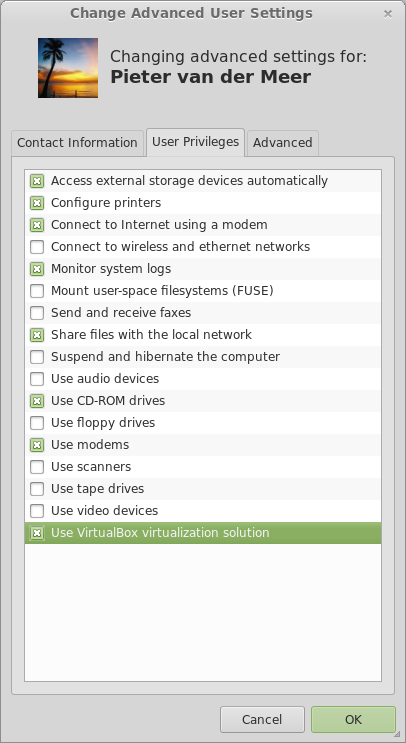
On the windows system install the drivers for the Pi and you are done. Make sure you enable the USB device to Windows, under the devices tab.
(During this process I had a few reboots, I know again why I don’t use windows, those updates take for ever….)